
Completing a Bill Submission requires detailed information. Please provide as much as you can to ensure a timely review of your bill. Missing information may delay the review process.
For more information on how to submit a bill with Impact, check out this article.
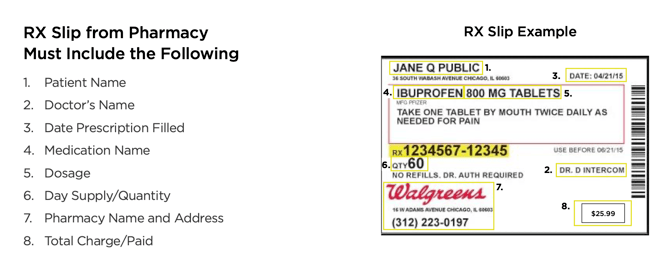
Everything you need will be found on the Prescription bottle. You may submit a clear picture of the information with your request.
Per the Guidelines: If a Member needs to submit a bill for processing, it must be submitted electronically using the Bill Submission Tool located in the Member Center. Members are responsible for gathering and providing all required information, as only complete submissions will be accepted for review and processing. Any costs incurred in obtaining necessary records or documentation are the responsibility of the Member.
Please ask your pharmacy for an itemized summary of your prescription. We especially need:
- Name of the medication
- Dose
- Quantity dispensed
- Date filled
- Pharmacy name
The above information is often listed on your prescription bottle or included in the written information provided with your prescription. Please upload the itemized summary along with your receipt of payment.